

Building on GitHub with Retool
We’re Sequin. We let you build apps and workflows on top of APIs like GitHub using just SQL and Postgres. We sync changes in the API to your database and vice-versa. We’re also excited about all the new ML/AI tooling that’s available for developers. One tool, embeddings, lets you search, cluster, and categorize your data in a whole new way. With your API data in Postgres, it’s easy to leverage embeddings to create powerful apps. Sign up to get GitHub in your Postgres database and follow along in the guide below!
In this post, I’ll show you how to build a tool in Retool. In the process, we’ll explore some neat tools including:- Retool’s Workflow product
- Retool’s App builder
- OpenAI’s API
- Embeddings
Curious about embeddings and what they’re used for? See our Salesforce blog post on the topic.
Overview
Your application will revolve around a Postgres database. Sequin will sync GitHub commits and PRs to your database. You’ll generate OpenAI embeddings for each of the GitHub objects you want to perform searches against. To perform a search, the user will type in a query, such as “embed Elixir struct into Postgres jsonb.” Then, you can take that query, turn it into an embedding, and compare its relatedness to the embeddings of all the commit messages and PR bodies. You’ll also need to setup a workflow to ensure new or updated PRs and commits that Sequin syncs to your database have their embeddings generated as well. The architecture will look like this: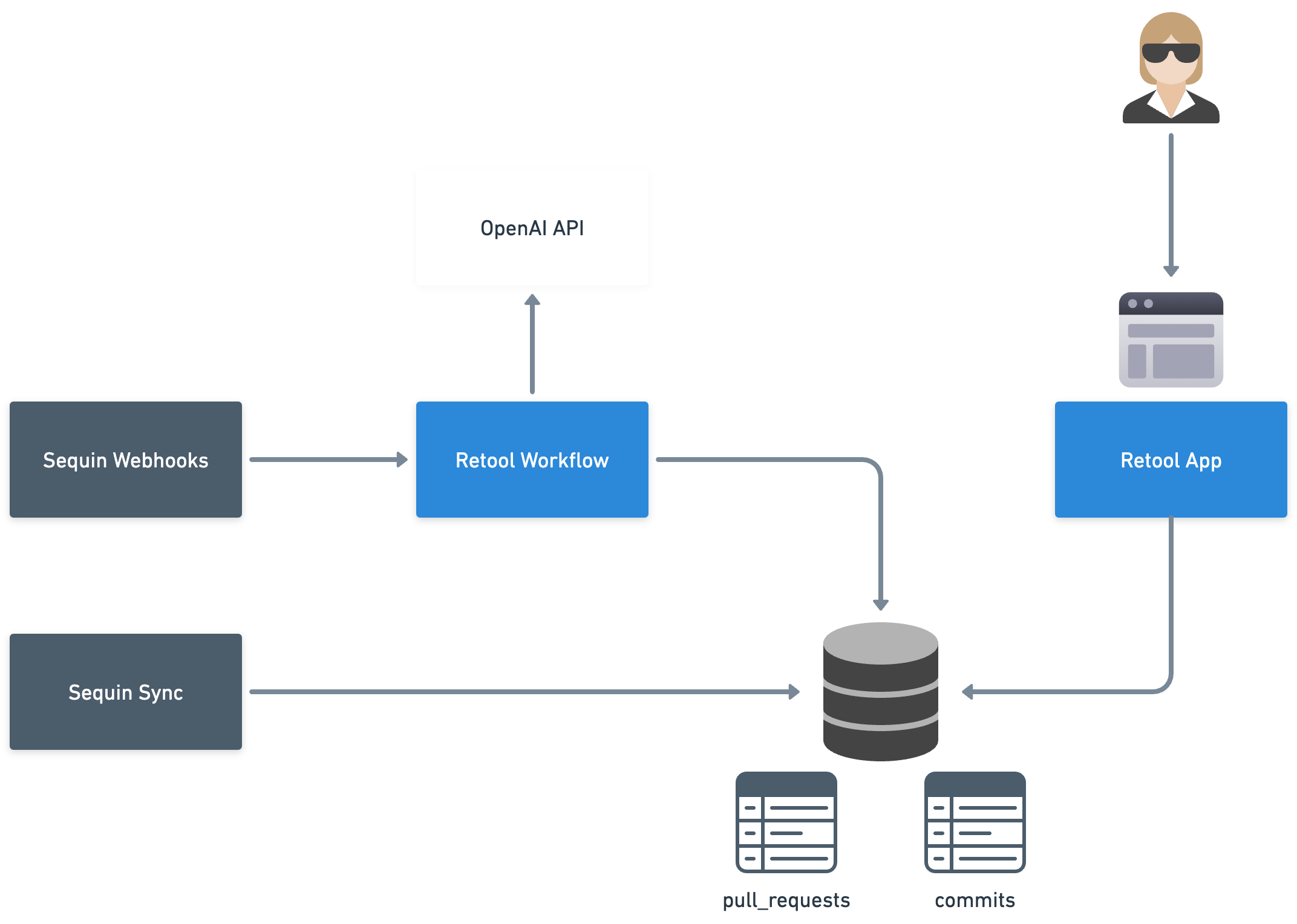
Prepare your database
To prepare your database, first add thepg_vector extension 1:
github_embedding, for your embedding data 2. In your queries, you’ll join your embedding tables to your GitHub tables.
Here’s an example of creating an embedding table for GitHub commits:
text-embedding-ada-002 model. That model generates embeddings with 1536 dimensions, hence the 1536 parameter above.
Generate embeddings on insert or update
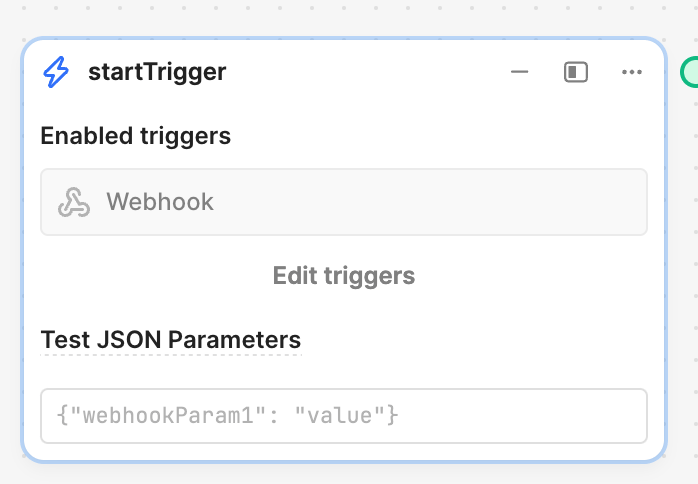
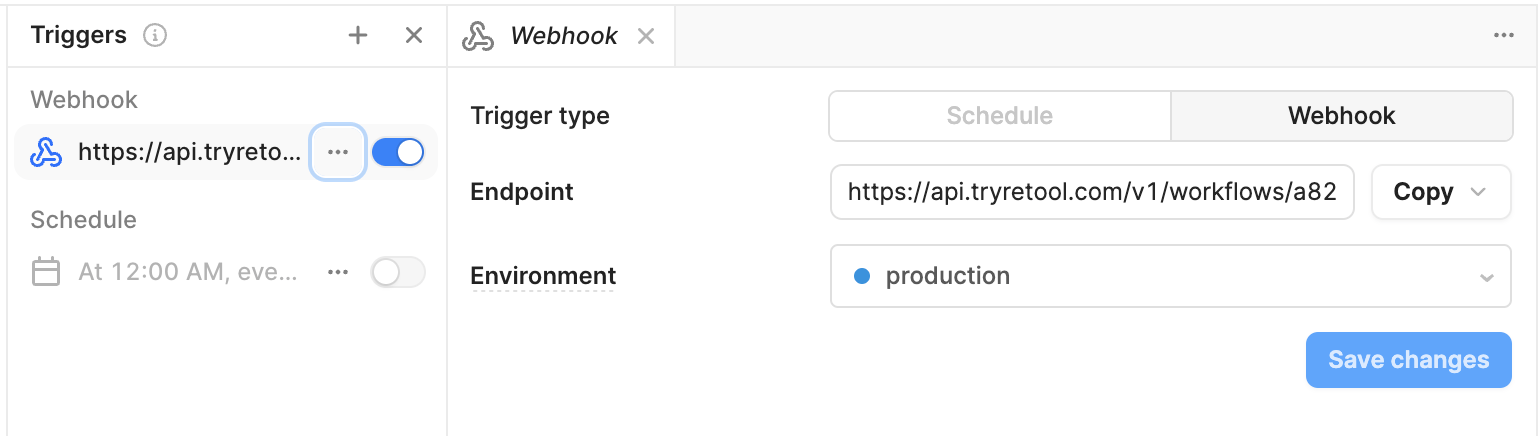
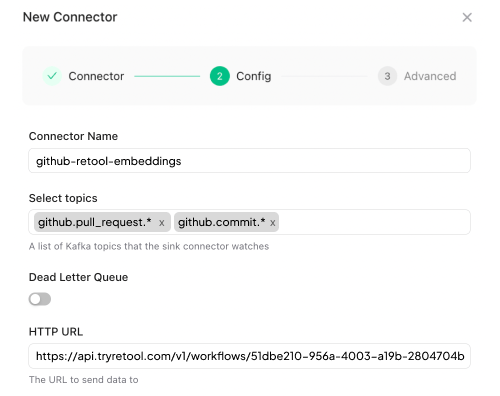
You’ll first setup your app to generate embeddings for GitHub records as they’re inserted or updated. Then, I’ll show you how to backfill embeddings for your existing records. You have two options for finding out about new or updated GitHub records in your database. You can use Postgres’ listen/notify protocol. It’s fast to get started with and works great. But, notify events are ephemeral, so delivery is at-most-once. That means there’s a risk of missing notifications, and therefore of there being holes in your data. Along with a sync to Postgres, Sequin provisions an event stream for you. Sequin will publish events to a serverless Kafka stream associated with your sync. Sequin will publish events like “GitHub Pull Request deleted” or “GtiHub Commit upserted.” You can configure connectors to this Kafka stream. One of the connectors is HTTP, which POSTs events to an endpoint you choose. We can use the HTTP connector to have events sent to a webhook endpoint over on Retool. That webhook endpoint can trigger a workflow, which we can use to update the embeddings table. Notably, unlike listen/notify, the Kafka stream is durable and the HTTP connector will retry on failure, meaning we can get at-least-once delivery. First, over on Retool, create a new Workflow. In thestartTrigger block, click “Edit triggers” and then toggle on “Webhook”:

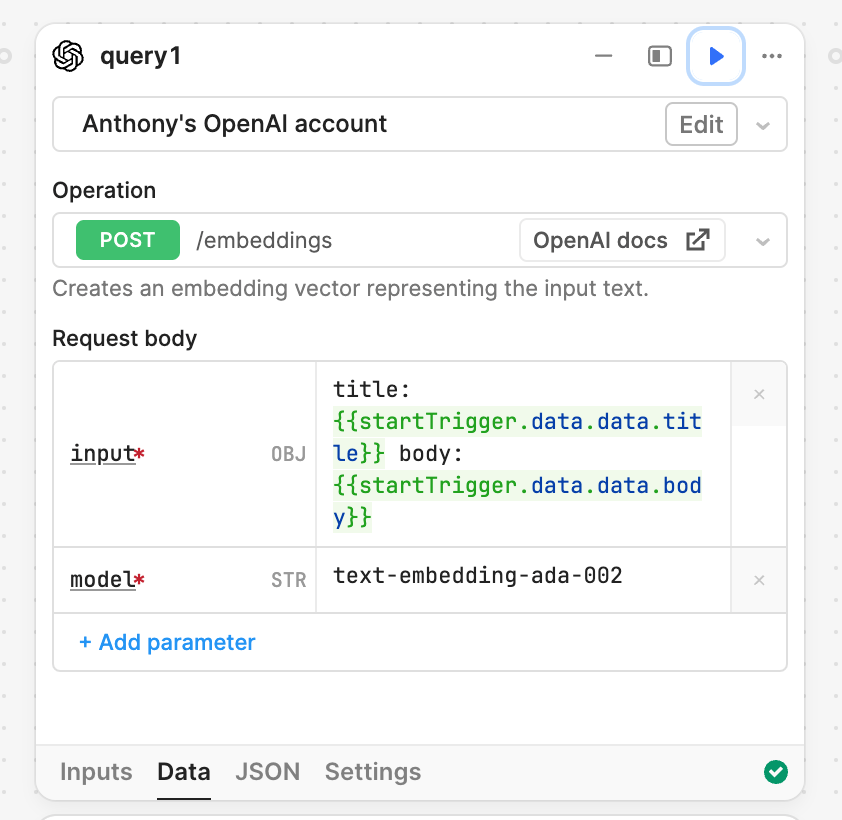
POST /embeddings. For the request body, set the input to the strings you want to generate the embeddings off of. In this example, we’re generating embeddings for a Pull Request, and using its title and body.
For the model, use OpenAI’s text-embedding-ada-002.
Press the “Play” icon and verify that your request works. You should see a JSON result from OpenAI that contains a list of a bunch of vectors.
Now that you have the embeddings, you’ll upsert them into your embedding table (see the create table statement above). I recommend you use Retool’s GUI mode to compose the upsert query. Not only is it easier to use than SQL mode for upserts. But getting vectors/arrays to work in Retool’s SQL mode is a little tricky.
Here’s how to configure your upsert:
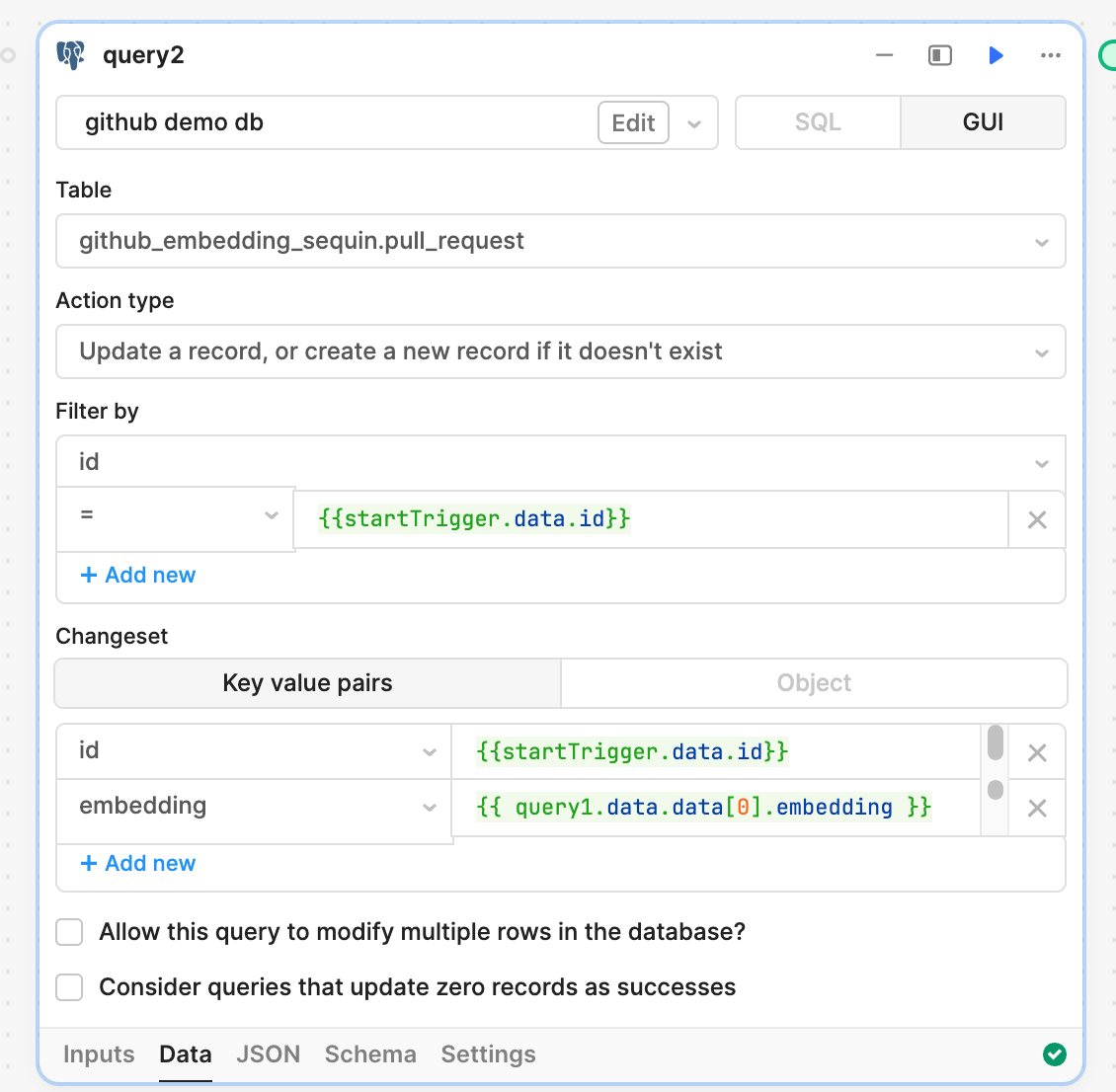
startTrigger.data.id for the id column and query1.data.data[0].embedding for the embedding column (assuming you left your OpenAI query to the default query1).
At this point, you’re ready to test things end-to-end. You can start by using a test event. In “Run history,” select an event then select startTrigger. Click the “Data” tab. Scroll down to the bottom and you’ll see “Use as example JSON.” Click that. Now, you should see “Test JSON parameters” populated for your startTrigger.
With test JSON parameters populated, you can step through each block: first, run the query to OpenAI and verify you get back a list of embeddings. 3 Next, run your upsert. Assuming that succeeds, check your database and verify a row was indeed inserted.
Now, deploy your Retool workflow. At this point, when a GitHub record is inserted or updated, your workflow will get triggered and populate the associated embedding record. Try it! Head over to GitHub and open or edit a PR. Just a few seconds afterwards, you should see the run get triggered over in Retool.
With your listener in place, the next step is to backfill all the records with null values for embedding in the database.
Backfill the embedding column for existing records
You have two primary options for backfilling the embedding column:
Create a batch job
You can write a one-off batch job that paginates through your table and kicks off API calls to fetch the embeddings for each record.
You can paginate through each table like this 4:
github.backfills.pull_request_embeddings. So, before kicking off the backfill, be sure to update your Webhook sink in the Sequin console to subscribe to the topic. That will ensure that events published to this topic get sent to your Retool workflow.
After the backfill has completed, you’ll have embeddings for all your desired GitHub objects!
Create a Postgres query for finding matches
With your embeddings setup in Postgres, you’re ready to create a mechanism for querying them. Supabase has a great post on embeddings in Postgres. I’ve adapted their similarity query below. You can use the cosine distance operator (<=>) provided by pg_vector to determine similarity. Here’s a query that grabs a list of pull_requests over a match_threshold, ordered by most similar to least similar:
Build the tool
With your data model and search function squared away, you can build your tool. It should have a table for results and a search bar. Below is a simple example of this tool. Here’s a demonstration of a search for Pull Requests that mention “serialize and deserialize structs into jsonb ecto”: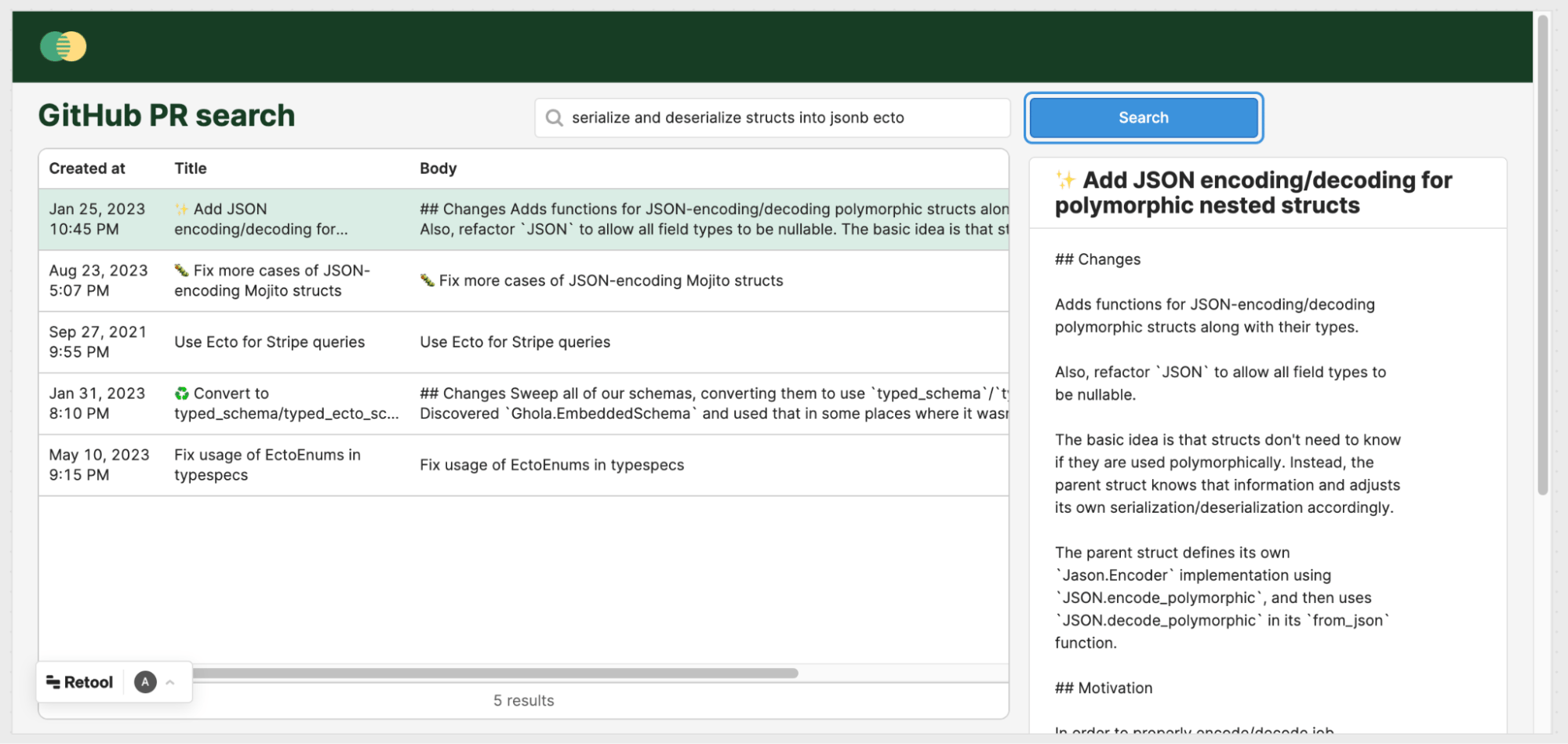
jsonb, just JSON.
Because of embeddings, we found the exact PR we were looking for, and with only a vague idea of what we were looking for!
To build a tool like this, drop in a basic table, a search bar, and a search button. Then, you’ll compose your queries and variables. Here will be the flow:
- Users can enter a search query into the app and press “Search.”
- Clicking “Search” will fire off
getQueryEmbedding(below), using OpenAI to convert the search input into an embedding. - When
getQueryEmbeddingreturns, it will set the value of the variablequeryEmbedding(below). - When the variable of
queryEmbeddingchanges, the Postgres querysearchPRs(below) runs. - Finally,
searchPRsdoes a similarity match between the embedding in the search query and the embeddings for all your GitHub Pull Requests stored in your database. It returns the most similar, rendering them in the table for your user to see.
searchPRs
First, create a new variable, queryEmbedding, for storing the embedding of the search query.
Then, create a new Postgres query called searchPRs. The body of the query will look like this:
queryEmbedding is being cast to vector (::vector) on the Postgres side. That’s because Retool doesn’t fully support Postgres vectors just yet. So, as you’ll see, we’re going to pass the database vectors as strings and have it cast the vectors into the right type.
Set this query to Run query automatically when inputs change.
getQueryEmbedding
Now, create a new query using the OpenAI adapter. This will take the search input and turn it into an embedding, using the same functionality you used earlier to generate embeddings for your GitHub Pull Requests:
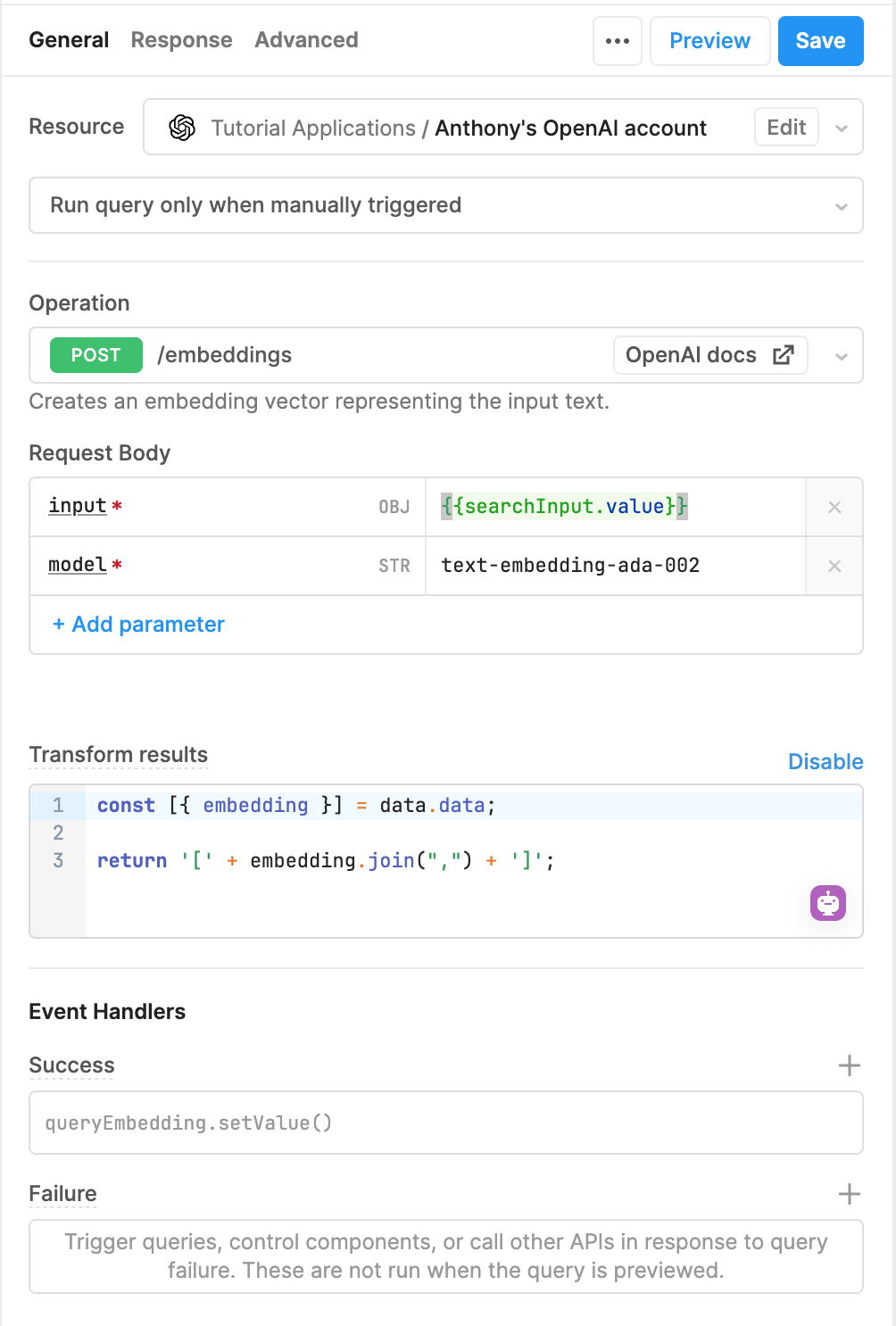
input to the value of the search field in your app.
In Transform results, you need to convert the array of floats into a string literal. As noted earlier, Retool’s Postgres adapter doesn’t support vectors. So, convert it to a string, and then the searchPRs query will turn the string into a vector in the database (::vector).
Finally, add an Event Handler. Set the value of the queryEmbedding variable to the output of this query.
With these queries in place, your app is wired up and ready to go!
Conclusion
Once you get a taste of embeddings, it’s hard to go back to search that’s restricted to only literal matches. Between commits, pull requests, and issues, there’s a lot to sift through when you’re looking for something specific. Embeddings help you find precisely what you want without being precise. But search is only one way you can use embeddings to build tooling on top of your GitHub data. You can also use embeddings to perform analysis on code that’s been committed, like the ratio of bugs to new features. Or to surface the most critical-seeming commits and PRs that have been pushed in the last few days. To get started building tools with Retool and embeddings on your GitHub data, give Sequin a spin in a free trial!Footnotes
-
pg_vectoris included in most of the latest distributions of Postgres. If you’re on AWS RDS, be sure you upgrade to Postgres 15.2+ to get access to thevectorextension. ↩ -
You can mix and match fields from different tables to generate embeddings. To start, you can keep it simple and generate embeddings that correspond to a single GitHub object. For most objects, you’ll probably choose to create an embedding for just one or two fields. For example, you don’t need to create an embedding for the whole Pull Request object, just the
titleandbodyfields. You can concatenate the two fields together into a newline-separated string, and generate the embedding on that. In the future, you can blend more fields or objects together to let you build on your data in novel ways. ↩ - Embeddings are difficult to “validate” just by looking at them – you can accidentally send OpenAI a meaningless blank string and they’ll still return a list of vectors. So, be sure to validate that all the variables in your query are properly populated. With test data in place, you can click on variables and Retool will display a popover of the value of the variable. ↩
- Normally a pagination strategy like this wouldn’t be safe unless IDs were auto-incrementing. But this will work fine in all situations, because we don’t care if we miss records that are inserted mid-pagination — those are being handled by our event handler above! ↩