> ## Documentation Index
> Fetch the complete documentation index at: https://sequin.io/docs/llms.txt
> Use this file to discover all available pages before exploring further.
# Auth0 Reference
> Build on Auth0 without limits. Sync all your Auth0 data to your Postgres database in real-time. Query your Users, Emails, and Organizations with SQL or your ORM. Get all API events in a hosted Kafka cluster. And `insert`, `update`, or `delete` Auth0 records in both Auth0 and your database simultaneously.
**Pardon the mess**
You are viewing docs related to an older version of Sequin. We're in the process of updating our provider-specific guides and will be done in a few weeks (May 2024). [Please click here](/docs/) to view the latest version of the docs.
If you're interested in Auth0 and want to learn more about what's changing, [send us a note](mailto:support@sequin.io).
## Supported objects[](#supported-objects "Direct link to Supported objects")
| Collection Name | Read | Write |
| ------------------ | ---- | ----- |
| Actions | ✅ | |
| Anomaly | ✅ | |
| Blacklists | ✅ | |
| Branding | ✅ | |
| Client Grants | ✅ | |
| Clients | ✅ | |
| Connections | ✅ | |
| Custom Domains | ✅ | |
| Device Credentials | ✅ | |
| Email Templates | ✅ | |
| Emails | ✅ | ✅ |
| Grants | ✅ | |
| Guardian | ✅ | |
| Jobs | ✅ | |
| Keys | ✅ | |
| Log Streams | ✅ | |
| Logs | ✅ | |
| Organizations | ✅ | ✅ |
| Prompts | ✅ | |
| Resource Servers | ✅ | |
| Roles | ✅ | ✅ |
| Stats | ✅ | |
| Tenants | ✅ | ✅ |
| Tickets | ✅ | ✅ |
| User Blocks | ✅ | |
| Users | ✅ | ✅ |
## Setup & installation[](#setup--installation "Direct link to Setup & installation")
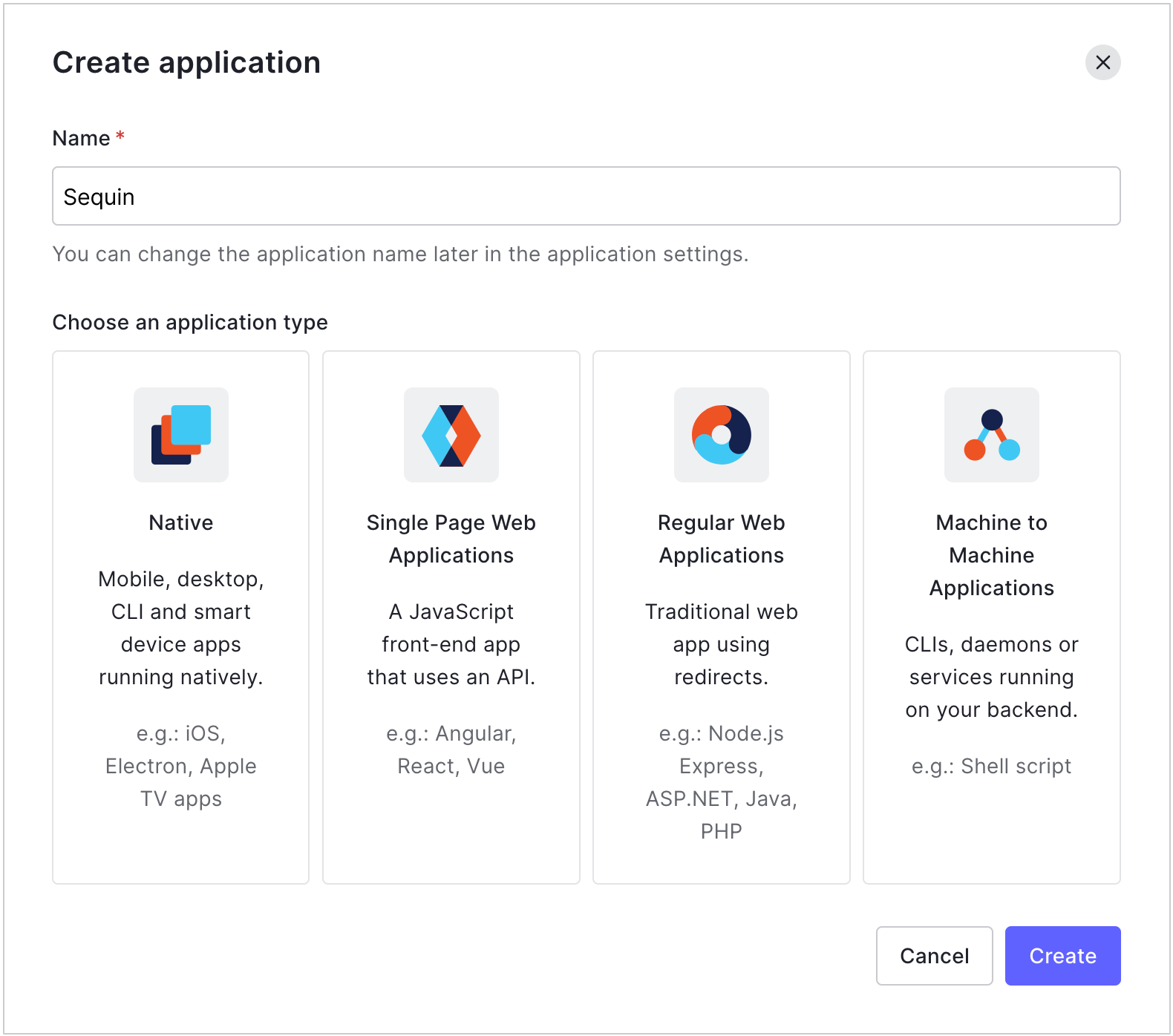
To connect Sequin to Auth0, you need to configure a **machine-to-machine** application for Sequin:
1. Go to [Dashboard > Applications > Applications](https://manage.auth0.com/#/applications) and click **Create Application**.
2. Name the app and select **Machine to Machine Applications**. Then click **Create**:
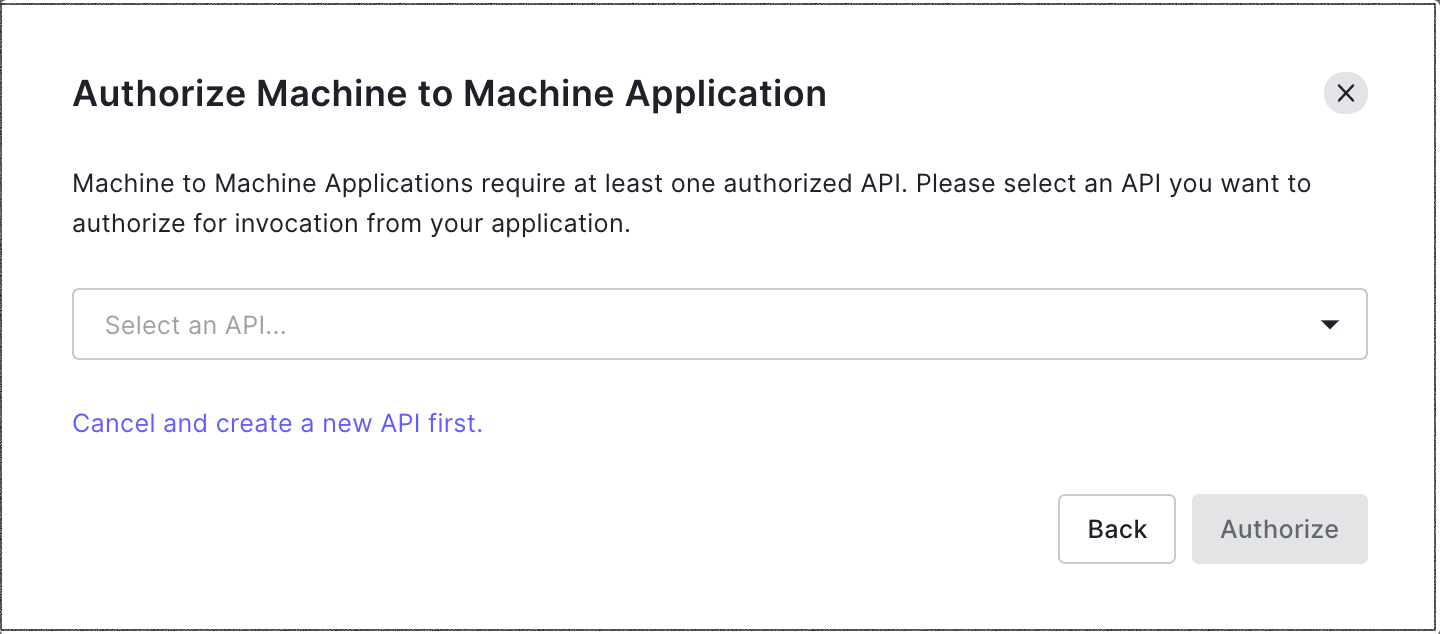
 1. Select the Auth0 APIs you want to allow Sequin to access:
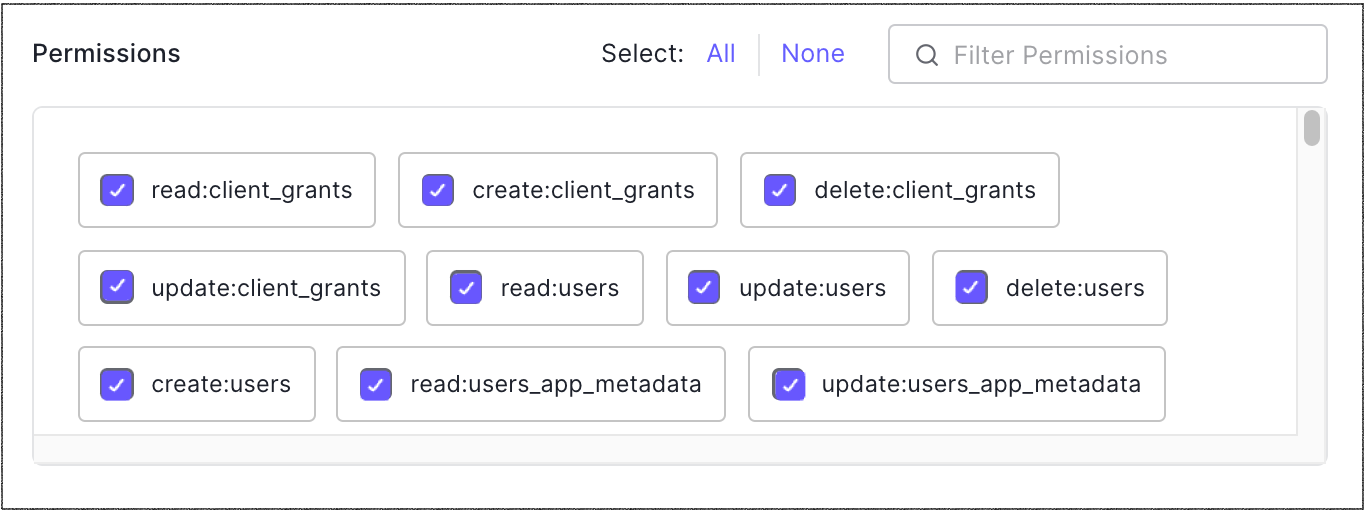
 1. For **Permissions**, make sure that:
* Sequin has all four permissions for Actions: `create:actions`, `read:actions`, `update:actions`, and `delete:actions`. Sequin uses Actions to run the sync.
* Sequin has read and write access to all the collections that you want to sync. For example, if you want to sync Users, be sure to select all four User scopes: `create:users`, `read:users`, `update:users`, and `delete:users`.
1. For **Permissions**, make sure that:
* Sequin has all four permissions for Actions: `create:actions`, `read:actions`, `update:actions`, and `delete:actions`. Sequin uses Actions to run the sync.
* Sequin has read and write access to all the collections that you want to sync. For example, if you want to sync Users, be sure to select all four User scopes: `create:users`, `read:users`, `update:users`, and `delete:users`.
 1. Click **Authorize**.
2. Auth0 will provide you with an API credential. Copy and paste that credential over to Sequin.
## The syncing process[](#the-syncing-process "Direct link to The syncing process")
We first backfill your database with all your Auth0 data. The time for the backfill depends on the size of your Auth0 account. Unless your Auth0 account has over a million records, the backfill should complete in under an hour. Smaller accounts complete in just a few minutes. We'll email you when your backfill is complete and Sequin has loaded all your data into your database.
After the initial backfill, we'll rely on Auth0 Actions to monitor changes. Sequin will create the Auth0 Actions it needs in your account. We backstop Actions with an occasional polling process to ensure we don't miss any events.
This means changes on Auth0 should propagate to your database in just a few seconds.
Learn more about \[our syncing process]/syncs.
## Read and write Auth0 data using SQL[](#read-and-write-auth0-data-using-sql "Direct link to Read and write Auth0 data using SQL")
You'll connect to your database via [Sequin's Postgres Proxy](/docs/sql-writes), which lets you read from your synced tables as well as write to them. You can use any SQL client that works with Postgres.
Here's an example of what your Auth0 tables might look like in your database:
```sql theme={null}
db7hea89oah3tas=> \dt
List of relations
Schema | Name | Type | Owner
--------+---------------------------+-------+----------
public | _sync_cdc | table | sequin
public | user | table | sequin
public | role | table | sequin
public | organization | table | sequin
public | email | table | sequin
public | tenant | table | sequin
(6 rows)
```
You'll see all the Auth0 objects you selected when setting up your sync are now tables in your database. You'll also see a `_sync_cdc` table which Sequin uses to manage your sync.
Here's what it looks like to query the `user` table:
```sql theme={null}
select
email,
email_verified,
username,
phone_number,
phone_verified,
user_id,
created_at,
updated_at,
last_login,
logins_count
from
user
where
user_id = 'auth0|5457edea1b8f22891a000004';
```
Which returns a row that looks like:
```sql theme={null}
-[ RECORD 1 ]---+-----------------------------
email | paul.atreides@dune.com
email_verified | f
username | muaddib
phone_number | +199912345678
phone_verified | f
user_id | auth0|5457edea1b8f22891a000004
created_at | 2023-11-10T08:00:00.000Z
updated_at | 2023-11-10T09:30:00.000Z
last_login | 2023-11-10T11:45:00.000Z
logins_count | 30
```
Writing back to Auth0 is as simple as writing a SQL query. For example, you can mark a user's email as verified like this:
```sql theme={null}
update user
set email_verified = true
where user_id = 'auth0|5457edea1b8f22891a000004';
```
Sequin will write this change to both Auth0 and your database at the same time.
If a write to Auth0 fails, Sequin will roll back the write to your database. For example, if you try to update a user's email to an invalid email address, you'll receive a Postgres error:
```sql theme={null}
update user
set email = 'invalid-email'
where user_id = 'auth0|5457edea1b8f22891a000004';
ERROR: [Auth0] invalid input syntax for type email: "invalid-email"
```
## Next steps[](#next-steps "Direct link to Next steps")
Your Auth0 tables are now available as fully readable and writeable tables in your database. You can query for all your data using SQL, and mutate data thanks to Sequin's Postgres Proxy. To build on this foundation, here are some next steps:
* [Setup your ORM](/docs/reads) to work with your synced tables.
* Edit the Auth0 objects and properties you're syncing at any time.
* Create [views](https://www.postgresql.org/docs/current/tutorial-views.html) on your Auth0 data to tailor your schema to your needs.
* Invite your team to your Sequin account and start building!
If you need assistance setting up your sync, just [send us a note](mailto:support@sequin.io). We're around and eager to help.
1. Click **Authorize**.
2. Auth0 will provide you with an API credential. Copy and paste that credential over to Sequin.
## The syncing process[](#the-syncing-process "Direct link to The syncing process")
We first backfill your database with all your Auth0 data. The time for the backfill depends on the size of your Auth0 account. Unless your Auth0 account has over a million records, the backfill should complete in under an hour. Smaller accounts complete in just a few minutes. We'll email you when your backfill is complete and Sequin has loaded all your data into your database.
After the initial backfill, we'll rely on Auth0 Actions to monitor changes. Sequin will create the Auth0 Actions it needs in your account. We backstop Actions with an occasional polling process to ensure we don't miss any events.
This means changes on Auth0 should propagate to your database in just a few seconds.
Learn more about \[our syncing process]/syncs.
## Read and write Auth0 data using SQL[](#read-and-write-auth0-data-using-sql "Direct link to Read and write Auth0 data using SQL")
You'll connect to your database via [Sequin's Postgres Proxy](/docs/sql-writes), which lets you read from your synced tables as well as write to them. You can use any SQL client that works with Postgres.
Here's an example of what your Auth0 tables might look like in your database:
```sql theme={null}
db7hea89oah3tas=> \dt
List of relations
Schema | Name | Type | Owner
--------+---------------------------+-------+----------
public | _sync_cdc | table | sequin
public | user | table | sequin
public | role | table | sequin
public | organization | table | sequin
public | email | table | sequin
public | tenant | table | sequin
(6 rows)
```
You'll see all the Auth0 objects you selected when setting up your sync are now tables in your database. You'll also see a `_sync_cdc` table which Sequin uses to manage your sync.
Here's what it looks like to query the `user` table:
```sql theme={null}
select
email,
email_verified,
username,
phone_number,
phone_verified,
user_id,
created_at,
updated_at,
last_login,
logins_count
from
user
where
user_id = 'auth0|5457edea1b8f22891a000004';
```
Which returns a row that looks like:
```sql theme={null}
-[ RECORD 1 ]---+-----------------------------
email | paul.atreides@dune.com
email_verified | f
username | muaddib
phone_number | +199912345678
phone_verified | f
user_id | auth0|5457edea1b8f22891a000004
created_at | 2023-11-10T08:00:00.000Z
updated_at | 2023-11-10T09:30:00.000Z
last_login | 2023-11-10T11:45:00.000Z
logins_count | 30
```
Writing back to Auth0 is as simple as writing a SQL query. For example, you can mark a user's email as verified like this:
```sql theme={null}
update user
set email_verified = true
where user_id = 'auth0|5457edea1b8f22891a000004';
```
Sequin will write this change to both Auth0 and your database at the same time.
If a write to Auth0 fails, Sequin will roll back the write to your database. For example, if you try to update a user's email to an invalid email address, you'll receive a Postgres error:
```sql theme={null}
update user
set email = 'invalid-email'
where user_id = 'auth0|5457edea1b8f22891a000004';
ERROR: [Auth0] invalid input syntax for type email: "invalid-email"
```
## Next steps[](#next-steps "Direct link to Next steps")
Your Auth0 tables are now available as fully readable and writeable tables in your database. You can query for all your data using SQL, and mutate data thanks to Sequin's Postgres Proxy. To build on this foundation, here are some next steps:
* [Setup your ORM](/docs/reads) to work with your synced tables.
* Edit the Auth0 objects and properties you're syncing at any time.
* Create [views](https://www.postgresql.org/docs/current/tutorial-views.html) on your Auth0 data to tailor your schema to your needs.
* Invite your team to your Sequin account and start building!
If you need assistance setting up your sync, just [send us a note](mailto:support@sequin.io). We're around and eager to help.