> ## Documentation Index
> Fetch the complete documentation index at: https://sequin.io/docs/llms.txt
> Use this file to discover all available pages before exploring further.
# Cheat sheet
> Here is a short reference of some powerful queries you now have at your fingertips.
**Pardon the mess**
You are viewing docs related to an older version of Sequin. We're in the process of updating our provider-specific guides and will be done in a few weeks (May 2024). [Please click here](/docs/) to view the latest version of the docs.
If you're interested in Airtable and want to learn more about what's changing, [send us a note](mailto:support@sequin.io).
## Tips[](#tips "Direct link to Tips")
| Tip | Use |
| ---------- | ------------------------------------------------------------------------------------------------------------------------------------------------------------------------------------------------------------------------------------------------------------------------------------------------------------------------------------------------------------------- |
| CAST | Change the data type for different values stored in your database. Airtable **Formulas** and **Lookup Values** can be numbers, strings, dates or timestamps. So we store the values as text or text\[], respectively. You can use CAST to convert text to INTEGER or DECIMAL or any other [PostgreSQL type](https://www.postgresql.org/docs/current/datatype.html). |
| TO\_DATE() | Change the data type from text to Date so that you can easily play with time. |
| ARRAY\[1] | Airtable fields that can contain multiple items (like multi-select, attachments, and lookup) will be stored as arrays in your database. Postgres uses a base-1 index here. |
| unnest() | Use unnest() to put every item in an array onto its own row. |
| ANY | Use ANY when doing JOINs on arrays in PostgreSQL. This is very common when joining two tables that were linked with a lookup field in Airtable. |
## Examples[](#examples "Direct link to Examples")
To play along with these example, you can setup a Sequin database connected to the [Airtable Inventory Tracker template](https://airtable.com/templates/local-business/expDrHGuyjSQlrKTq/inventory-tracking).
### `CAST`[](#cast "Direct link to cast")
Airtable **Formulas** and **Lookup Values** can be numbers, strings, dates, or timestamps. So these fields are stored in your Postgres database as `text` and `text[]` columns, respectively.
Let's say you want to calculate your total revenue using SQL. Yo do so, you'll sum up the `total_price` for all the purchase orders. Since total price is a formula in Airtable, we record it as type `text` in your Sequin database. So to calculate your total revenue, you'll need to cast the `total_price` as an integer:
```sql theme={null}
SELECT sum(purchase_orders.total_price::int) from purchase_orders;
```
The `::` *casts* the `total_price` column to an integer to then calculate the sum.
**Answer:** Total revenue is \\\$17,280.
### `JOIN` with `ANY`[](#join-with-any "Direct link to join-with-any")
A JOIN will let you use your Airtable data in new ways.
For example, let's say you want to use your warehouse space better. It would be helpful to see how many products are on each shelf in your warehouse.
To do so, you can `JOIN` the `warehouse_locations` table with the `product_inventory` table and calculate the total inventory of all the products on each specific shelf:
```sql theme={null}
SELECT
warehouse_locations.name,
SUM((product_inventory.units_ordered::INTEGER) - (product_inventory.units_sold::INTEGER)) AS "Inventory"
FROM warehouse_locations JOIN product_inventory
ON product_inventory.id = ANY (warehouse_locations.product_inventory)
GROUP BY warehouse_locations.name
ORDER BY warehouse_locations.name ASC;
```
Note the use of `ANY`. When performing the `JOIN`, there are many products associated with each warehouse location. These values are stored in an array. With `ANY`, you can `JOIN` on each value in the array.
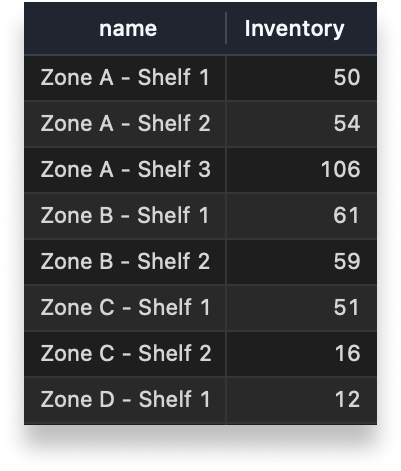 **Answer:** The results are clear: shelf 3 is doing all the work :)
### `UNION`[](#union "Direct link to union")
You'd like to send your design team all your product images scattered across your product inventory and your purchase orders.
To do so, you need to do a `UNION` of the `product_inventory` table and the `purchase_orders` table:
```sql theme={null}
SELECT product_inventory.images FROM product_inventory
UNION
SELECT purchase_orders.image FROM purchase_orders;
```
**Answer:** The results are clear: shelf 3 is doing all the work :)
### `UNION`[](#union "Direct link to union")
You'd like to send your design team all your product images scattered across your product inventory and your purchase orders.
To do so, you need to do a `UNION` of the `product_inventory` table and the `purchase_orders` table:
```sql theme={null}
SELECT product_inventory.images FROM product_inventory
UNION
SELECT purchase_orders.image FROM purchase_orders;
```
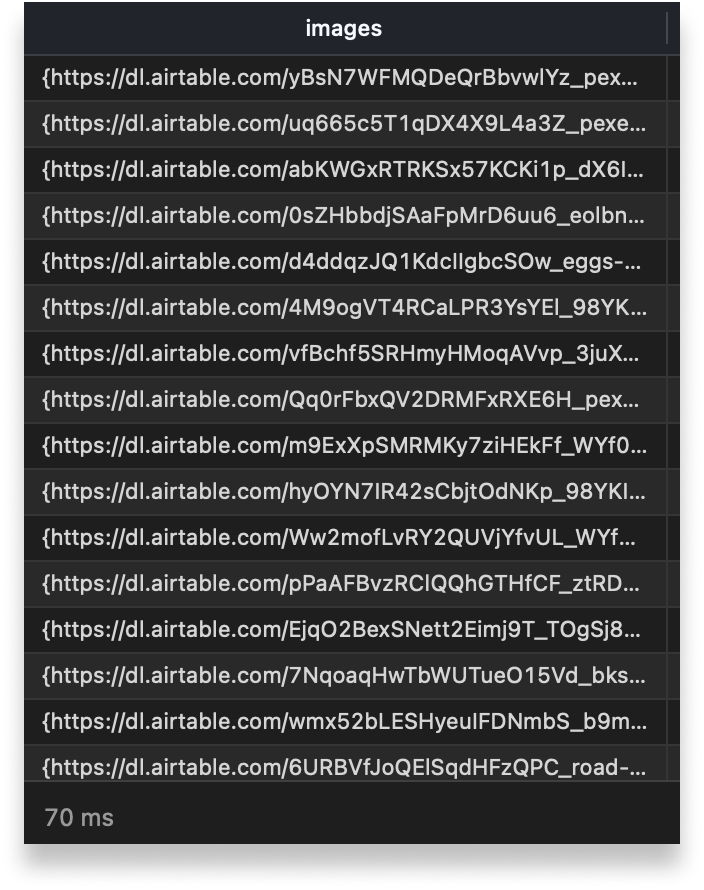 **Answer:** Your list of 42 images is ready in 70ms. (Now imagine getting that answer in Airtable...)
Hopefully this cheat sheet of PostgreSQL helps you unlock your data. If not, search on Google - SQL is very well documented - or [send us a note](mailto:support@sequin.io) ↙
**Answer:** Your list of 42 images is ready in 70ms. (Now imagine getting that answer in Airtable...)
Hopefully this cheat sheet of PostgreSQL helps you unlock your data. If not, search on Google - SQL is very well documented - or [send us a note](mailto:support@sequin.io) ↙